Feature spec
Goal: Send a clear invoice after finishing a job.
- Add a client, line items, a due date, and payment instructions.
- Preview the total before exporting a PDF.
- Keep an editable draft if export fails.
Fast
$2.99 · In-app purchases
Evidence scope: No current overall US chart position is available. Category-chart positions shown in discovery are a separate scope. Revenue is a directional model estimate, not verified earnings.
A product spec, screen plans, and build steps for your coding agent.
First kit free with a verified email
Combine features and design from your favorite apps.
Kit ready. Verify your email to download it.
Generating… usually about a minute.
What should your app do differently? Your note travels with the kit so your coding agent builds around your idea.
A product spec, phased build plan, differentiation notes, and screen references.
Illustrative example: an invoice app for independent contractors. Your kit is tailored to the app you choose; this is not its generated content.
Goal: Send a clear invoice after finishing a job.
Invoice editor: Client at the top, editable line items in the middle, total and preview action at the bottom.
States: Empty draft, validation errors beside each field, exporting, and a retry action that preserves the draft.
Hypothesis: Contractors need faster repeat invoices more than more templates.
First experiment: Test duplicating a previous job with five contractors. Watch where they hesitate before expanding the feature set.
The full kit adds a phased build plan, evidence notes, tool prompts, and implementation guidance. It is a plan for your coding agent, not a finished app.
Usage: Mechanics are fair game; never reuse the original name, branding, assets, or verbatim copy.
JavaScript is required to complete mailbox verification.
Good fit for mobile-first iOS and Android prototypes with managed app scaffolding.
Rork plan preview for Radar HD Future Weather Radar: map the core Weather workflow, choose the smallest differentiated feature set, define the data and monetization boundaries, then prototype the riskiest user journey first.
Preview ready. Verify your email to reveal and copy the full prompt.
JavaScript is required to complete mailbox verification. Return to this prompt preview.
Affiliate link: CloneChart may earn a commission at no extra cost
Original App Store material. Ratings and screenshots describe the existing app, not proof of demand for your version.
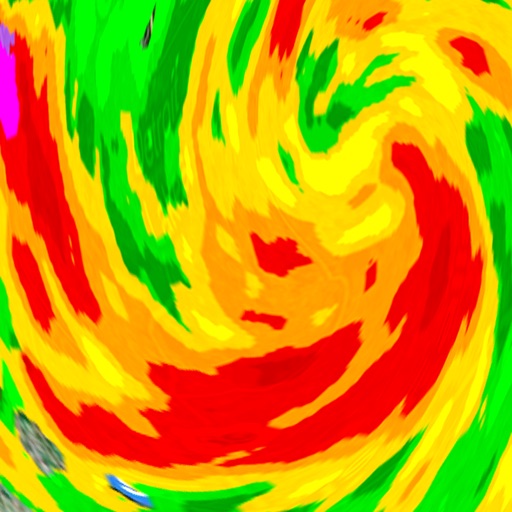
Fast. Simple. Predictive high-resolution Weather Radar. Severe weather warnings. Storm tracks and future projections. Satellite cloud animation. Use Radar HD to see what weather is coming your way! Radar shows areas of current precipitation or future simulated radar prediction!. A weather radar is used to locate precipitation, calculate its motion, estimate its type (rain, snow, hail, etc.), and forecast its future position and intensity. Precipitation type is indicated by the color. Green color indicates lesser precipitation while the yellow color code indicates intense precipitations. The color code red is indicative of the most intense precipitations. Blue color indicates snow. Using the data from Storm Prediction Center and Global Disaster Alert and Coordination System (SPC & GDAC) Radar HD provides information about tropical storms and hurricanes for locations worldwide, areas affected by storms and severe weather, coordinates and wind speed, storm tracks & path projections. Satellite images provide an excellent view on the clouds in the sky and an indication of the weather over the United states, Europe, Japan, Australia and Indonesia. Satellite images come from satellites which remain above a fixed point on the Earth (i.e. they are “geostationary”). Lighter areas of cloud show where the cloud tops are cooler and therefore where weather features like fronts and shower clouds are. The app also allows you to check the weather on your favorite places on maps. Interactive map includes live international weather conditions, local weather and time, ten-day forecasts and sunrise/sunset times for multiple places. You can add placemarks on the map to represent your favorite places or the places you’d like to visit. At a glance you can see the time and weather for all of your favorites. Key features: * [NEW] Predictive weather radar * [NEW] Simulated radar prediction for the next 60 minutes using five-minute intervals * The real time radar images provided by NEXRAD an accurate view of the weather situation in the U.S. * Storm / hurricane / typhoon tracker and projected paths (International and Global) * All severe weather alerts on interactive map, 126 weather alert types (U.S.) * High resolution weather radar. Stunning and sharp images. (U.S.) * Animated satellite images of cloud cover (U.S., E.U., Japan, Australia) * Current weather conditions directly on the map. 130,000 locations worldwide. * Current weather details and ten-day forecast in pop-up window. Features include: * three different layers to get the weather: ground stations, radar and satellite. * zoom in and out, drag and scroll * play, pause animations at any zoom level * displays current position on the map * saves and restores your last position * adjustable radar image quality for Wi-Fi and cellular connections
Written user reviews are not shown here. Check current App Store reviews >
These are generated suggestions, not verified review quotations. Check current App Store reviews and speak with users before treating a possible gap as a requirement.
Hypothesis 1
Assumption to check: Limited radar details compared to competitors
Validate with people who use this workflow before building.
Hypothesis 2
Assumption to check: Occasional inaccuracies in weather data
Validate with people who use this workflow before building.
Hypothesis 3
Assumption to check: Difficulties in managing saved locations
Validate with people who use this workflow before building.
Hypothesis 4
Assumption to check: Minimal customization options
Validate with people who use this workflow before building.
Plan a focused first version with your coding agent. These are planning assumptions, not a delivery guarantee.
Choose one audience and one core workflow. Use the kit to agree on its screens, data, and acceptance criteria before building.
Decide which secondary features, integrations, and platform support can wait. Your version does not need to reproduce everything in the original.
Validate external services, specialist technology, data access, and ongoing costs for your chosen scope.
From the Build Kit assessment.
A reliable timeline needs an agreed scope and a technical check. Ask your agent to estimate the phases in BUILD_PLAN.md after that review.


