Feature spec
Goal: Send a clear invoice after finishing a job.
- Add a client, line items, a due date, and payment instructions.
- Preview the total before exporting a PDF.
- Keep an editable draft if export fails.
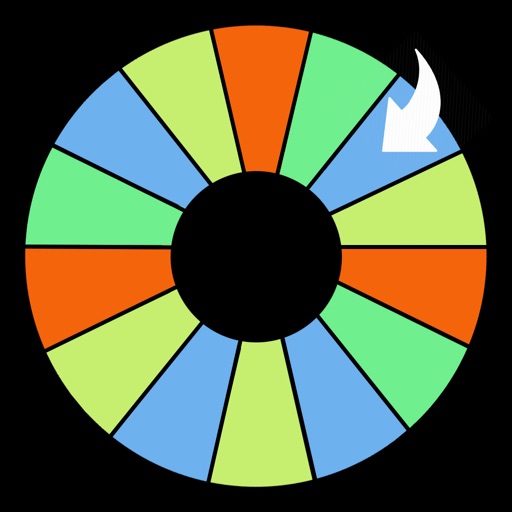
Now available for iPhone and iPad! Seen At X-Games, Sport Stadiums, Casinos, Concerts, Tradeshows & More! Over 15,000 Downloads - A Top 50 Productivity App
$9.99 · In-app purchases
Evidence scope: No current overall US chart position is available. Category-chart positions shown in discovery are a separate scope. Revenue is a directional model estimate, not verified earnings.
A product spec, screen plans, and build steps for your coding agent.
First kit free with a verified email
Combine features and design from your favorite apps.
Kit ready. Verify your email to download it.
Generating… usually about a minute.
What should your app do differently? Your note travels with the kit so your coding agent builds around your idea.
A product spec, phased build plan, differentiation notes, and screen references.
Illustrative example: an invoice app for independent contractors. Your kit is tailored to the app you choose; this is not its generated content.
Goal: Send a clear invoice after finishing a job.
Invoice editor: Client at the top, editable line items in the middle, total and preview action at the bottom.
States: Empty draft, validation errors beside each field, exporting, and a retry action that preserves the draft.
Hypothesis: Contractors need faster repeat invoices more than more templates.
First experiment: Test duplicating a previous job with five contractors. Watch where they hesitate before expanding the feature set.
The full kit adds a phased build plan, evidence notes, tool prompts, and implementation guidance. It is a plan for your coding agent, not a finished app.
Usage: Mechanics are fair game; never reuse the original name, branding, assets, or verbatim copy.
JavaScript is required to complete mailbox verification.
Good fit for mobile-first iOS and Android prototypes with managed app scaffolding.
Rork plan preview for iPrizeWheel HD: map the core Productivity workflow, choose the smallest differentiated feature set, define the data and monetization boundaries, then prototype the riskiest user journey first.
Preview ready. Verify your email to reveal and copy the full prompt.
JavaScript is required to complete mailbox verification. Return to this prompt preview.
Affiliate link: CloneChart may earn a commission at no extra cost
Original App Store material. Ratings and screenshots describe the existing app, not proof of demand for your version.
Now available for iPhone and iPad! Seen At X-Games, Sport Stadiums, Casinos, Concerts, Tradeshows & More! Over 15,000 Downloads - A Top 50 Productivity App PadGadget.com - 4/5 Stars "Every so often I have the opportunity to evaluate an app that makes me say ‘now that is a really cool use for the iPad!’ iPrizeWheel is one of those apps." AppAdvice.com - 4/5 Stars "iPrizeWheel HD is [an inexpensive] alternative to a physical prize wheel. It does what it’s advertised to do and it does it well." ipad-apps-review-online.com - 4/5 Stars "This is an app that you have to try [at your next] party. The games were already exciting and having to spin the wheel to get a prize was even better." iPadnGravy.com "If you or your organization are constructing a raffle or other promotion you should consider iPrizeWheel." --- The prize wheel & game wheel have finally been reinvented for the digital iPad and iPhone revolution! Introducing iPrizeWheel V4, the spin wheel app that turns your iPad and iPhone into a portable game wheel, customizable in just minutes! Why spend up to $1,500 on a heavy, bulky plastic wheel that's expensive to ship, time-consuming to customize, can break in an instant, and locks you into a single theme/brand? Now you can bring the prize wheel experience with you while you walk through a crowd, or let people come to you at your own location or booth. Use screen mirroring on an external HDTV or large-format monitor for an even bigger draw and watch the crowds form out of nowhere as people line up to interact with your brand and cheer on the winners! iPrizeWheel is completely realistic with sound effects and spin motion. It is ideal for any occasion where fun is required and excitement around your brand is a must: - Trade Shows - Concerts / Live Events - Education / Classrooms - Kiosks / Booths - Sports Bars / Restaurants - Youth Groups / Parties - Radio Stations - Retail - Dentist/Ortho Offices BASIC EDITION FEATURES... - Manage A Single 16 or 24 Panel Campaign - Set Up To 2 Different Panel Colors - Change Panel Text Color - Change Middle Circle Color - Change Spin Arrow Color - Set Panel Prizes With Greater Customization Options UPGRADE TO PREMIUM EDITION Our Premium Edition is packed with even more customization options and data collection tools to make your events a huge success... - Add / Manage Unlimited Campaigns - 1-Click Campaign Copying - Custom "CONGRATS" Screen Text - Set Up To 4 Different Panel Colors - Add Your Own Logo - Access 32 Panel Wheel - Turn On Powerful Data Collection Tools (Collect Contact Info & Store Prize Giveaway Details) - Customize Your Data Entry Screen w/ 14 field options. - Kiosk Mode (in-app screensaver) - Export/Import Campaign Settings For Multiple iPads - Customize Fonts and Font Sizes On Panels - Toggle Spin Time Between 7 and 3 Seconds - Toggle Spin Click Sound On/Off - Edit the Congrats Sound At the End Of the Wheel Spin (Play Any Sound/Song Loaded On iPad) - More Color Customization - Change the Spin Arrow, Background, Wheel Borders, and Prize Arrow - More Congrats Screen Customization - Change Text Color, Background Color, and Opacity UPGRADE TO GOLD EDITION - Add Custom Data Fields and Checkboxes to Data Collection Panel - Add images and icons to your panels, prizes, and congrats screen! (Platinum Edition) - Change the arrow icon to any shape or image! (Platinum Edition) - Select the new full-screen wheel view! (Platinum Edition) - Change the color of the arrow or prize icons! (Platinum Edition)Control Panel/Prize Weight and Probability UPGRADE TO THE NEW V4 PLATINUM EDITION - Add images and icons to your panels, prizes, and congrats screen! (Platinum Edition) - Change the arrow icon to any shape or image! (Platinum Edition) - Select the new full-screen wheel view! (Platinum Edition) - Change the color of the arrow or prize icons! (Platinum Edition) See iPrizeWheel in action now at http://www.iPrizeWheel.com. And please email us with comments at [email protected].
Written user reviews are not shown here. Check current App Store reviews >
These are generated suggestions, not verified review quotations. Check current App Store reviews and speak with users before treating a possible gap as a requirement.
Hypothesis 1
Assumption to check: Limited customization options for segments and wheels
Validate with people who use this workflow before building.
Hypothesis 2
Assumption to check: Cluttered interface with too many options
Validate with people who use this workflow before building.
Hypothesis 3
Assumption to check: Performance issues with larger wheels
Validate with people who use this workflow before building.
Hypothesis 4
Assumption to check: Lack of social sharing features
Validate with people who use this workflow before building.
Plan a focused first version with your coding agent. These are planning assumptions, not a delivery guarantee.
Choose one audience and one core workflow. Use the kit to agree on its screens, data, and acceptance criteria before building.
Decide which secondary features, integrations, and platform support can wait. Your version does not need to reproduce everything in the original.
Validate external services, specialist technology, data access, and ongoing costs for your chosen scope.
From the Build Kit assessment.
A reliable timeline needs an agreed scope and a technical check. Ask your agent to estimate the phases in BUILD_PLAN.md after that review.


