Feature spec
Goal: Send a clear invoice after finishing a job.
- Add a client, line items, a due date, and payment instructions.
- Preview the total before exporting a PDF.
- Keep an editable draft if export fails.
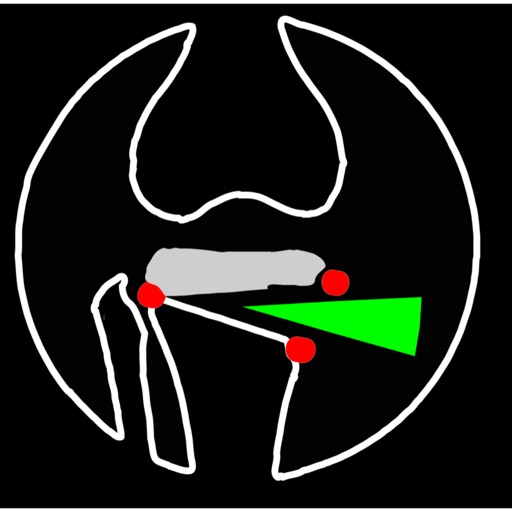
Mal alignment of the hip, knee, and ankle leads to premature cartilage damage and to development of degenerative arthritis of knee joint
$24.99 · In-app purchases
Evidence scope: No current overall US chart position is available. Category-chart positions shown in discovery are a separate scope. Revenue is a directional model estimate, not verified earnings.
A product spec, screen plans, and build steps for your coding agent.
First kit free with a verified email
Combine features and design from your favorite apps.
Kit ready. Verify your email to download it.
Generating… usually about a minute.
What should your app do differently? Your note travels with the kit so your coding agent builds around your idea.
A product spec, phased build plan, differentiation notes, and screen references.
Illustrative example: an invoice app for independent contractors. Your kit is tailored to the app you choose; this is not its generated content.
Goal: Send a clear invoice after finishing a job.
Invoice editor: Client at the top, editable line items in the middle, total and preview action at the bottom.
States: Empty draft, validation errors beside each field, exporting, and a retry action that preserves the draft.
Hypothesis: Contractors need faster repeat invoices more than more templates.
First experiment: Test duplicating a previous job with five contractors. Watch where they hesitate before expanding the feature set.
The full kit adds a phased build plan, evidence notes, tool prompts, and implementation guidance. It is a plan for your coding agent, not a finished app.
Usage: Mechanics are fair game; never reuse the original name, branding, assets, or verbatim copy.
JavaScript is required to complete mailbox verification.
Good fit for mobile-first iOS and Android prototypes with managed app scaffolding.
Rork plan preview for OsteotomyApp: map the core Medical workflow, choose the smallest differentiated feature set, define the data and monetization boundaries, then prototype the riskiest user journey first.
Preview ready. Verify your email to reveal and copy the full prompt.
JavaScript is required to complete mailbox verification. Return to this prompt preview.
Affiliate link: CloneChart may earn a commission at no extra cost
Original App Store material. Ratings and screenshots describe the existing app, not proof of demand for your version.
Mal alignment of the hip, knee, and ankle leads to premature cartilage damage and to development of degenerative arthritis of knee joint. Femoral and tibial osteotomies around the knee are established procedures for the restoration of the physiological load distribution of pressure at the knee joint. Accurate preoperative planning is mandatory to avoid under correction or overcorrection of axes or placing the joint-line in obliquity that ends to insufficient postoperative alignment.The majority of osteotomies are still planned and performed using conventional techniques drawing over transparent papers, cumbersome measurements etc. The app assists at preoperative correction planning by calculating : -the amount of correction preoperatively by calculating the dimension of wedge size , the correction angle and osteotomy gap opening or closing. -mechanical axis deviation (in mm) MAD, anatomical and mechanical femoral axes angle (aMFA),mechanical lateral proximal femoral angle (mLPFA), mechanical lateral distal femoral angle(mLDFA), joint line convergence angle (JLCA),mechanical medial proximal tibial angle (mMPTA), Mechanical lateral distal tibial angle (mLDTA), Hip Knee Ankle line (HKA) ,Mid joint line (MJL) orientation. -objectively the deviation or deformity in the frontal plane (varus or valgus) and differentiate the level of deformity (femoral and or tibial origin) and according to measured angles objectively suggest where indicated, medial or lateral, open or closed-wedge distal femur osteotomy or high-tibial osteotomy or double osteotomies and avoiding unwanted obliquity of the joint line App allows he surgeon to -change the planned mechanical axis to pass at the preferred percentage (Fujisawa point) after evaluation of the residual cartilage thickness left on the involved compartment. select the location of hinge point of correction osteotomy for planning of varus or valgus corrections -evaluate in real time the success of intended osteotomy by evaluating the kinematic alignment of the knee (KAO), avoiding residual joint obliquity or malalignment. -measure the correction angle adjusted due to ligament instability and preoperatively calculate the height of osteotomy gap opening. -pressing + or - button, one degree of correction is added or subtracted respectively and the second plane of osteotomy emerges and printed in screen real offering real time simulation of the wedge osteotomy in an instant to comprehend in real time what parameters are affected and modify favourably the correction angle. All above mentioned angles and all limp axes are redrawn and updated accordingly for the given new correction angle. The drawn schematic gives the impression of settings act as a whole interchangable interacting unit. - dynamicaly preview and easily predict potential intraoperative errors, that could emerge and choose the optimal degree of correction without disruption kinematic alignment of the limp. -to combine correction- Biplanar-, at coronal plane and sagittal plane (based on Hernigou 2001 calculations ) on tibia slope and provide the direction of the plane (ω angle) in which the osteotomy (open or closed) should be made ,the height the opening or closing wedge and the correction angle (Δ angle), -to simulate, before real bone cuts are done and try different strategies in relation to the location, the type of osteotomy, the joint obliquity without to redraw in paper board countless drawings in an effort to achieve the optimal correction and mean while taking into account and balancing all influencing preoperative factors. -real time dynamically change of mechanical axis lines, modify also the drawings of femur and the tibia and in instant depicting a precise preview of the whole preoperative plan for optimal results. -categorisation of the deformities based to international literature normal references values, help to indicate to user the type of osteotomy.
Written user reviews are not shown here. Check current App Store reviews >
These are generated suggestions, not verified review quotations. Check current App Store reviews and speak with users before treating a possible gap as a requirement.
Hypothesis 1
Assumption to check: Limited understanding of complex procedures
Validate with people who use this workflow before building.
Hypothesis 2
Assumption to check: Inadequate user engagement
Validate with people who use this workflow before building.
Hypothesis 3
Assumption to check: Limited resources or references
Validate with people who use this workflow before building.
Hypothesis 4
Assumption to check: Difficulty in finding specific procedures
Validate with people who use this workflow before building.
Plan a focused first version with your coding agent. These are planning assumptions, not a delivery guarantee.
Choose one audience and one core workflow. Use the kit to agree on its screens, data, and acceptance criteria before building.
Decide which secondary features, integrations, and platform support can wait. Your version does not need to reproduce everything in the original.
Validate external services, specialist technology, data access, and ongoing costs for your chosen scope.
From the Build Kit assessment.
A reliable timeline needs an agreed scope and a technical check. Ask your agent to estimate the phases in BUILD_PLAN.md after that review.


