Feature spec
Goal: Send a clear invoice after finishing a job.
- Add a client, line items, a due date, and payment instructions.
- Preview the total before exporting a PDF.
- Keep an editable draft if export fails.
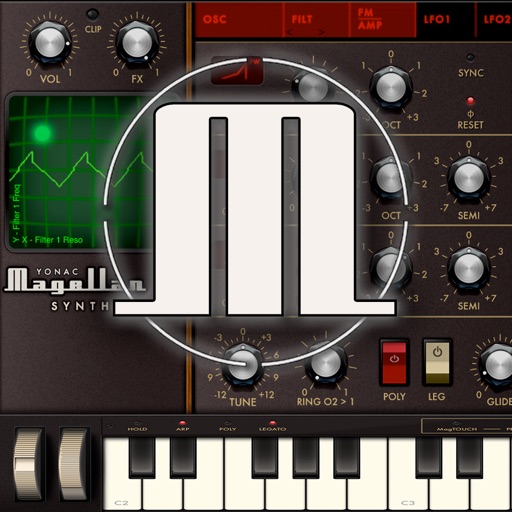
A classic is reborn! With its introduction nearly a decade ago, Magellan pushed the boundaries of iOS technology and quickly took its place among the platform’s most popular synths
$14.99 · In-app purchases
Evidence scope: No current overall US chart position is available. Category-chart positions shown in discovery are a separate scope. Revenue is a directional model estimate, not verified earnings.
A product spec, screen plans, and build steps for your coding agent.
First kit free with a verified email
Combine features and design from your favorite apps.
Kit ready. Verify your email to download it.
Generating… usually about a minute.
What should your app do differently? Your note travels with the kit so your coding agent builds around your idea.
A product spec, phased build plan, differentiation notes, and screen references.
Illustrative example: an invoice app for independent contractors. Your kit is tailored to the app you choose; this is not its generated content.
Goal: Send a clear invoice after finishing a job.
Invoice editor: Client at the top, editable line items in the middle, total and preview action at the bottom.
States: Empty draft, validation errors beside each field, exporting, and a retry action that preserves the draft.
Hypothesis: Contractors need faster repeat invoices more than more templates.
First experiment: Test duplicating a previous job with five contractors. Watch where they hesitate before expanding the feature set.
The full kit adds a phased build plan, evidence notes, tool prompts, and implementation guidance. It is a plan for your coding agent, not a finished app.
Usage: Mechanics are fair game; never reuse the original name, branding, assets, or verbatim copy.
JavaScript is required to complete mailbox verification.
Good fit for mobile-first iOS and Android prototypes with managed app scaffolding.
Rork plan preview for Magellan Synthesizer 2: map the core Music workflow, choose the smallest differentiated feature set, define the data and monetization boundaries, then prototype the riskiest user journey first.
Preview ready. Verify your email to reveal and copy the full prompt.
JavaScript is required to complete mailbox verification. Return to this prompt preview.
Affiliate link: CloneChart may earn a commission at no extra cost
These are generated suggestions, not verified review quotations. Check current App Store reviews and speak with users before treating a possible gap as a requirement.
Hypothesis 1
Assumption to check: Limited sound customization options for advanced users.
Validate with people who use this workflow before building.
Hypothesis 2
Assumption to check: Steep learning curve for beginners.
Validate with people who use this workflow before building.
Hypothesis 3
Assumption to check: High price point compared to similar apps.
Validate with people who use this workflow before building.
Hypothesis 4
Assumption to check: Performance issues on older devices.
Validate with people who use this workflow before building.
Original App Store material. Ratings and screenshots describe the existing app, not proof of demand for your version.
A classic is reborn! With its introduction nearly a decade ago, Magellan pushed the boundaries of iOS technology and quickly took its place among the platform’s most popular synths. Continuing this pedigree, Yonac’s flagship Magellan Synthesizer 2 is a new alchemy of pristine sounds, innovative features, and devotion to user friendliness — all the same preserving the wicked soul of the original. Cutting-edge synthesis technology, punchier tones, warmer filters, greater modulation options, AUv3, MPE, brand-new presets: these are just a few of Magellan’s features for a whole new era. SIGNAL GENERATORS Magellan’s beating heart is its three realtime virtual-analog oscillators: with their pulse width and blend parameters, the first two connect to a unique Timbre module to derive many additional waveforms. A special Oscillator Unison stage activates additional “secret” oscillators to supply up to 24 oscillators per voice — perfect for supersaws, or true chorus/flange effects obtained right at the synthesis stage. A fully configurable Maximizer module helps create even bigger stereophonic sounds by activating up to 120 simultaneous oscillators per voice. FM A powerful yet intuitive FM module gives life to Magellan’s unique hybrid design. With its very own ADSR and variable contour generator (with 3 different envelope shapes), it works as an additional sound source and transforms Magellan 2 into a very capable frequency modulation synthesizer. Combined with other oscillators and modulation features, it generates strong multi-layered textures impossible via subtractive synthesis alone. FILTERS Two independent filter banks, 11 different filters, series/parallel selection with variable balance — these newfangled filters incorporate nonlinearities and analog-derived quirks that impart them hefty servings of aural “sugar”. The addition of “FAT” controls helps give added gravitas and harmonic content. Dedicated ADSRs (with extra long maxes) feature A/B/C contour generators for totally different playing characteristics. MODULATION Twin LFOs, modulation envelope, as well as direct control: the backbone of a powerful and versatile modulation system that can take 16 simultaneous targets, each with its own variable amount. In addition, each LFO/Envelope target can be assigned a secondary control (including via MIDI) to dynamically vary or even “piggyback” its modulating signal. The inbuilt XY-pad can hit any pair of 140 parameters for realtime control, while the “EZ Velocity” module helps quickly dial in the right touch for amplitude, filters & FM. SPAWN2 Second generation Yonac SPAWN unlocks the power of A.I. to help create countless original presets. Powered with an Expert mode, three different algorithms, and configurable machine autonomy down to module level, you can produce anything from subtle variations on a theme to wild new sounds with unrivaled “hit rate” — all at the touch of a button. AUv3, MIDI & MPE The ultra-efficient synth engine and flexible user interface are specially designed so that you can run many Magellans simultaneously in your favorite AUv3 DAW or Mixer. Along with massively featured MIDI I/O (complete with MIDI learn/recall, program changes, et al.), Magellan 2 is also MPE compatible with full polyphonic pitch control. Aftertouch and even CC74 are assignable through the mod matrices — and the new onscreen MagTOUCH MPE controller provides voice-wise expression not only within Magellan, but to other MPE apps/devices and inside compatible DAWs as well. ...AND MORE Analog-inspired 32x4 step/pattern sequencer with gate, velocity and skip; ChordMaker with note matrix that maps one key into a chord; powerful, easy-to-use arp with live & program modes; FX rack featuring 10 stereo units and configurable signal flow; 360+ factory presets, with a bank custom produced by Sunsine Audio; Ableton Link, YPAT3 preset management, patch translator, app recorder are just a few more of Magellan Synthesizer 2 features.
Written user reviews are not shown here. Check current App Store reviews >
Plan a focused first version with your coding agent. These are planning assumptions, not a delivery guarantee.
Choose one audience and one core workflow. Use the kit to agree on its screens, data, and acceptance criteria before building.
Decide which secondary features, integrations, and platform support can wait. Your version does not need to reproduce everything in the original.
Validate external services, specialist technology, data access, and ongoing costs for your chosen scope.
From the Build Kit assessment.
A reliable timeline needs an agreed scope and a technical check. Ask your agent to estimate the phases in BUILD_PLAN.md after that review.


